
When GPS is missing.
Pinzy looks at architecture, road signs, terrain, light, and other visual clues.
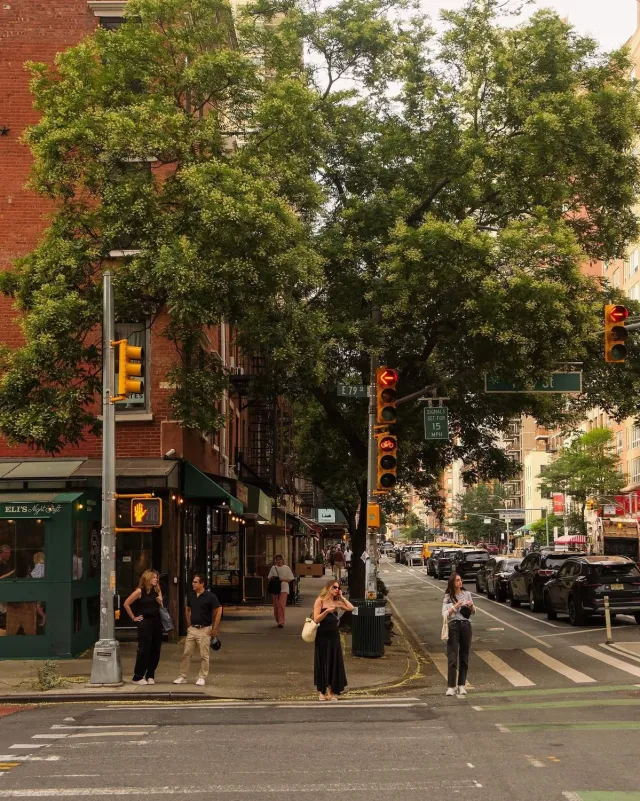 Reading visual cluesBrick façadeStreet signTraffic signal
A screenshot. An old photo. A picture someone sent. Pinzy reads the visual clues and suggests a location on the map.
Choose a photo. Pinzy finds a possible location and puts it on the map.
Possible match · East 79th Street
Pinzy reads visual clues when metadata is missing. Recent results stay on your device.
Pinzy looks at architecture, road signs, terrain, light, and other visual clues.
Reading visual cluesBrick façadeStreet signTraffic signalYour recent results stay in a private history on your device.


“I found the street from an old photo of my parents’ first trip to New York. They couldn’t remember where it was taken.”
“Saw a tiny restaurant in an Instagram post with no location tag. Pinzy got me to the right block.”
“I use it for old camera-roll photos that lost their location data. The map makes every guess easy to check.”
Photos are processed only to find a location and are never stored on Pinzy servers.
Try Pinzy with a photo from your library.
Download on the App Store